Description
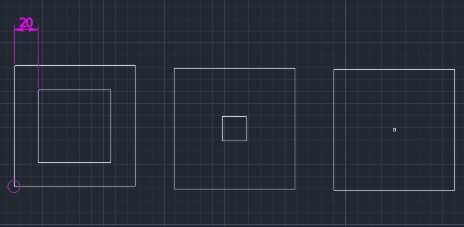
This tool automatically draws a double rectangle (a rectangle with an inner offset).
- Function
- It simplifies creating two concentric rectangles by specifying the gap (offset distance) between them.
- Compatibility
- This is a dedicated Cadopilar Lisp tool and works only within Cadopilar.
How to use
(Implicit step based on context) You likely need to define the dimensions of the rectangle (e.g., top-right corner or width/height), although the snippet emphasizes the starting point and offset value.
The double rectangle is drawn automatically.
- 1.Type DREC in the command line and press Enter.
- 2.Click the Bottom-Left Corner point of the rectangle.
- 3.Enter the Offset Distance (the gap between the inner and outer rectangles).
Example
Included free
All 401 LISP utilities come free with every Cadopilar license.
Purchase any Cadopilar license and our team will install the complete suite for you. No additional charge, no setup headaches.
Contact us to get started →