Description
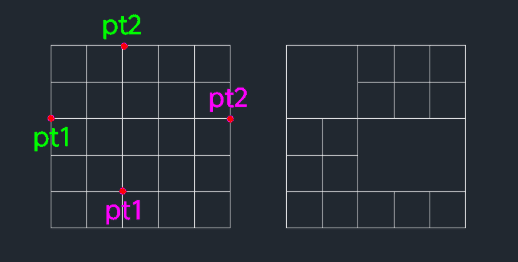
This tool merges multiple cells in a table by removing the internal grid lines within a specified area.
- Cleaning
- Any objects located inside the selected cells will also be deleted during the merge process.
- Efficiency
- Quickly consolidates adjacent cells into a single larger cell by selecting the diagonal corners of the area.
How to use
The internal lines (and any objects within) are deleted, merging the cells.
- 1.Type mg in the command line and press Enter.
- 2.Click the First Corner Point (PT1) of the range to merge.
- 3.Click the Opposite Corner Point (PT3) of the range.
Example
Included free
All 401 LISP utilities come free with every Cadopilar license.
Purchase any Cadopilar license and our team will install the complete suite for you. No additional charge, no setup headaches.
Contact us to get started →