Description
This tool calculates the total sum of selected text numbers and writes the result into a specified area.
- Smart Filtering
- Automatically recognizes only numeric text objects even when multiple types of objects are selected.
- Negative Support
- Correctly interprets and calculates negative values (minus signs).
How to use
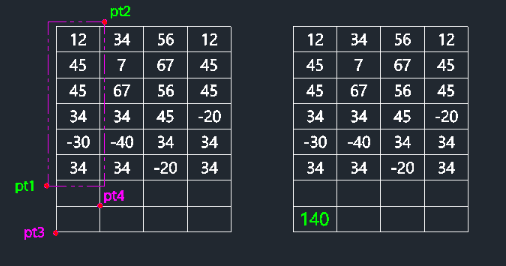
The total sum is displayed at the selected location.
- 1.Type sum in the command line and press Enter.
- 2.Click Point 1 and Point 2 to define a selection window covering the numbers you want to add.
- 3.Press Enter to confirm the selection.
- 4.Click the Target Position where you want the sum result to be written.
Example
Included free
All 401 LISP utilities come free with every Cadopilar license.
Purchase any Cadopilar license and our team will install the complete suite for you. No additional charge, no setup headaches.
Contact us to get started →