LISP Utilities
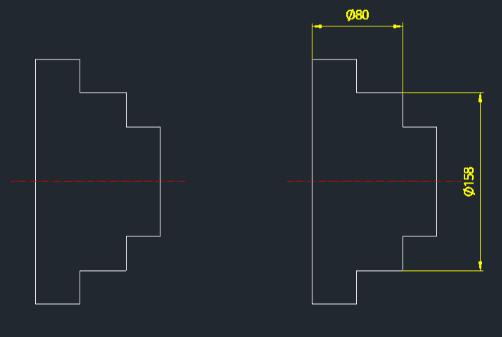
DLIPDLiP.ELFLinear Dimension with Automatic Phi (Ø) Symbol
Generates linear dimensions with diameter symbol(Ø)
Description
This tool automatically adds the diameter symbol (Ø) as a prefix to the dimension text while creating a linear dimension.
- Automatic Prefix
- Saves time by inserting the "Ø" symbol automatically, which is commonly required for dimensioning cylindrical objects in 2D views.
- Precision Control
- Allows you to specify the number of decimal places before creating the dimension.
- Constraint
- This tool works specifically for Linear Dimensions (Horizontal and Vertical) only.
How to use
Create the dimension by picking the first and second extension line origins, just like a standard linear dimension command.
The resulting dimension will appear with the Ø symbol preceding the value (e.g., Ø80).
- 1.Type dlip in the command line and press Enter.
- 2.Enter the desired number of decimal places (precision) and press Enter.
Example
Included free
All 401 LISP utilities come free with every Cadopilar license.
Purchase any Cadopilar license and our team will install the complete suite for you. No additional charge, no setup headaches.
Contact us to get started →