LISP Utilities
DMDM.ELFMove Dimension Line/Text with Two Clicks
Relocates dimension components via two-point input.
Description
This tool allows you to easily move dimension lines, extension lines, or dimension text to a new position using a simple two-click operation.
- Rubber Band Guide
- A visual "rubber band" line appears after selecting the dimension, allowing you to see exactly where the line will be moved.
- Quick Adjustment
- It simplifies the process of adjusting dimension positions compared to standard grip editing.
How to use
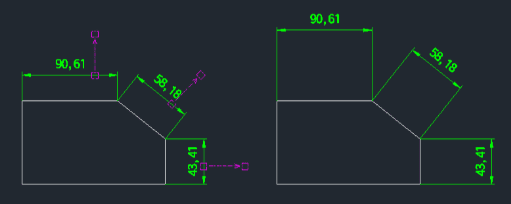
A rubber band line will appear from the selected point. Move your cursor to the desired target position.
- 1.Type dm in the command line and press Enter.
- 2.Select the dimension line you want to move.
- 3.Click the second point to snap the dimension line to that new location.
Example
Included free
All 401 LISP utilities come free with every Cadopilar license.
Purchase any Cadopilar license and our team will install the complete suite for you. No additional charge, no setup headaches.
Contact us to get started →