Description
This tool merges multiple separate linear dimensions into a single combined dimension.
- Merge Function
- It combines selected linear dimensions (Horizontal/Vertical only) into one continuous dimension line.
- Important Caution
- If the current dimension style settings (such as DIMSCALE) differ from the original dimensions, the arrow size and text height of the merged dimension may change to match the current settings.
How to use
The selected dimensions are combined into a single dimension.
- 1.Type DIMMG in the command line and press Enter.
- 2.Click two points to create a Crossing Window over the dimensions you want to merge.
- 3.Press Enter.
Example
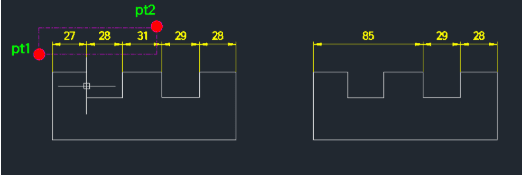
Included free
All 401 LISP utilities come free with every Cadopilar license.
Purchase any Cadopilar license and our team will install the complete suite for you. No additional charge, no setup headaches.
Contact us to get started →