Description
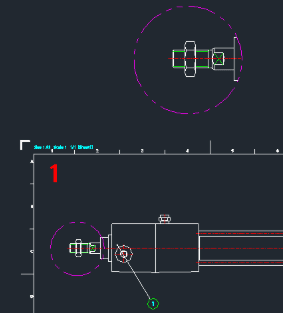
Generates 2D detail views for specific areas of the drawing.
- Dual Shape Support
- Supports extraction of both Circular and Rectangular detail areas.
- Auto-Formatting
- Automatically handles blocks and dimensions (explodes them for the detail view) and creates a PHANTOM layer (Color 6) for the detail boundary if it doesn't exist.
How to use
- 1.Type DETAIL in the command line and press Enter.
- 2.Select the boundary type from the dialog window (Rectangle or Circle).
- 3.Specify the area on the drawing.
Note
- When using the Rectangle option, you must define the area from Top-Left to Bottom-Right.
Example
Included free
All 401 LISP utilities come free with every Cadopilar license.
Purchase any Cadopilar license and our team will install the complete suite for you. No additional charge, no setup headaches.
Contact us to get started →