Description
This tool enhances the standard distance measurement (DIST) command by adding a Multiple (M) option, similar to AutoCAD, but with even more functionality.
- Continuous Measurement
- Allows you to measure multiple distances in a row without restarting the command.
- Cumulative Mode
- Can use the end point of the previous measurement as the start point for the next one (chain measurement).
- Repeated Mode
- Can repeatedly measure separate distances (two points at a time) continuously.
How to use
- 1.Type DISTM in the command line and press Enter.
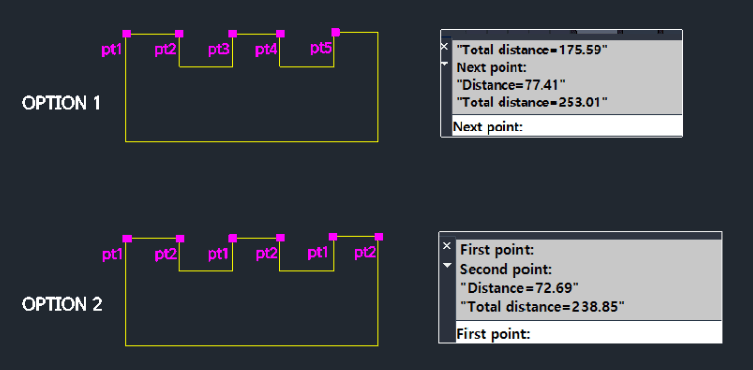
- 2.Select an option from the dialog window:
- Option 1 (Continuous / Chain Mode)
- Measures a continuous path. The endpoint of the last measurement automatically becomes the start point of the next. (Displays cumulative total).
- Option 2 (Multiple Segments Mode)
- Measures separate, non-connected segments (e.g., A to B, then C to D). (Displays cumulative total).
Note
- Decimal precision is determined by your system's UNITS setting.
Example
Included free
All 401 LISP utilities come free with every Cadopilar license.
Purchase any Cadopilar license and our team will install the complete suite for you. No additional charge, no setup headaches.
Contact us to get started →