LISP Utilities
DELTEXTdeltext.elfDelete Text (By Height)
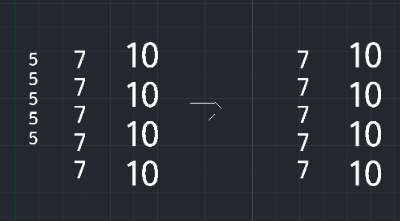
Mass-delete all text objects of specific height
Description
This tool is designed to mass-delete text objects based on their specific height properties.
- Selective Deletion
- Targets only DTEXT (Single Line Text) objects with a specific height value, leaving other text untouched.
- Global Scope
- Scans the entire drawing and removes matching text instantly.
How to use
Input the target Text Height (integer or decimal) that you wish to remove.
All DTEXT objects matching that exact height will be deleted from the drawing immediately.
- 1.Type DELTEXT in the command line and press Enter.
Example
Included free
All 401 LISP utilities come free with every Cadopilar license.
Purchase any Cadopilar license and our team will install the complete suite for you. No additional charge, no setup headaches.
Contact us to get started →