LISP Utilities
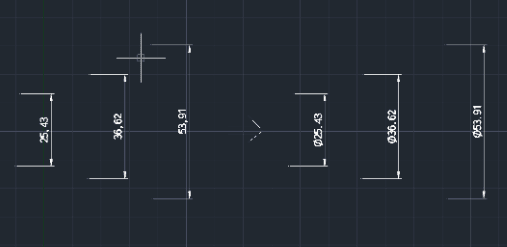
ADDPIaddpi.elfAdd Diameter Symbol (ø)
Adds the diameter symbol (Φ) to dimension objects. Supports simultaneous selection of multiple dimensions.
Description
This tool automatically adds the Diameter symbol (Φ) to the text of selected dimension objects.
- Batch Processing
- You can select multiple objects at once. The tool automatically filters the selection to apply the change only to dimension objects, ignoring others.
- Smart Update
- Replaces the need to manually edit text to add Φ
How to use
The tool creates the Φ symbol in front of the dimension text instantly.
- 1.Type ADDPI in the command line and press Enter.
- 2.Select the desired decimal precision if prompted (updated feature).
- 3.Select the dimension objects (or drag a window over the entire drawing area).
Example
Included free
All 401 LISP utilities come free with every Cadopilar license.
Purchase any Cadopilar license and our team will install the complete suite for you. No additional charge, no setup headaches.
Contact us to get started →