LISP Utilities
DBHdbh.elfDraw Equal Division Lines
Generates equally spaced lines between two selected lines.
Description
This tool automatically draws lines to divide the space between two selected lines into equal segments.
- Function
- It is useful for quickly creating grids or dividing an area into equal parts without manual calculation.
- Requirement
- If the boundary lines are Polylines, they must be exploded before using this command.
- Menu Update
- Starting with this version, a dedicated menu is being added to the Cadopilar interface to help users access tools without memorizing commands.
How to use
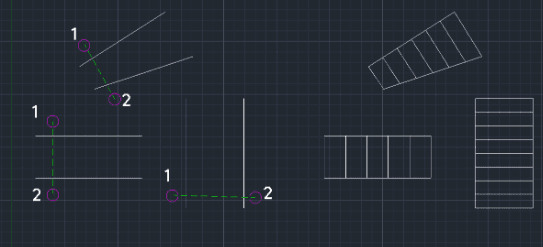
The tool automatically draws the dividing lines between the two selected boundaries.
- 1.Type DBH in the command line and press Enter.
- 2.Select the two lines you wish to divide between. You do this by clicking a start point and an end point to create a crossing selection window over the two lines.
- 3.Enter the Number of Divisions (how many equal parts you want) and press Enter.
Example
Included free
All 401 LISP utilities come free with every Cadopilar license.
Purchase any Cadopilar license and our team will install the complete suite for you. No additional charge, no setup headaches.
Contact us to get started →