LISP Utilities
CTRCTR.elfTrim Wall Intersection (4-Way)
Trims intersecting double lines to form a 4-way cross
Description
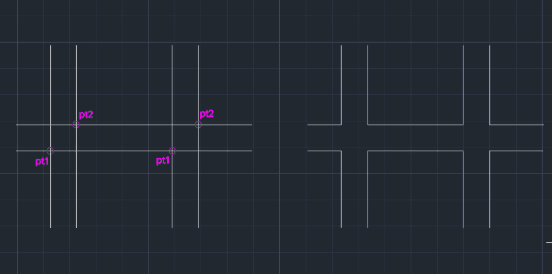
This tool automatically trims the middle section of intersecting double walls in architectural drawings.
- Context
- It is similar to the previously released 3TR and 9TR commands but is specifically designed for cleaning up the center intersection of double walls.
- Function
- It removes the overlapping lines in the middle of a wall intersection with just two clicks.
- Compatibility
- This is a dedicated Cadopilar Lisp tool and works only within Cadopilar.
How to use
The middle portion of the double wall intersection is automatically trimmed and cleaned up.
- 1.Type ctr in the command line and press Enter.
- 2.Click the Bottom-Left Intersection Point of the area to be trimmed.
- 3.Click the Top-Right Intersection Point of the area.
Example
Included free
All 401 LISP utilities come free with every Cadopilar license.
Purchase any Cadopilar license and our team will install the complete suite for you. No additional charge, no setup headaches.
Contact us to get started →