LISP Utilities
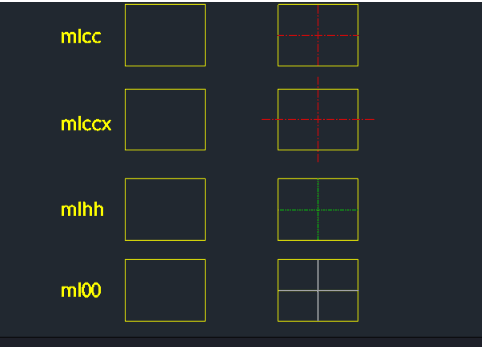
ML00MLCC, MLCCX, MLHHMLCC.elfDraw Lines Between Midpoints
Draws a line connecting object midpoints (Visible, Center, or Hidden).
Description
This tool allows you to conveniently draw lines connecting the midpoints of an object (like a rectangle).
- Feature
- It automatically detects the midpoint (forcing MID Osnap) even if Object Snap is not currently enabled.
- Variety
- You can draw three types of lines: Outline, Centerline, and Hidden Line.
- Extension
- The MLCCX command specifically extends the centerline by 20% beyond the object boundaries, which is a common drafting standard.
- Compatibility
- This is a dedicated Cadopilar Lisp tool and works only within Cadopilar.
How to use
Move your mouse cursor near the middle of the first object's edge. The tool will automatically snap to the Midpoint.
Move to the second object's edge and click its Midpoint.
The line (e.g., an extended centerline) is automatically drawn between the two points.
- 1.Type the desired command (e.g., mlccx) in the command line and press Enter.
- 2.Click the first midpoint.
Example
Included free
All 401 LISP utilities come free with every Cadopilar license.
Purchase any Cadopilar license and our team will install the complete suite for you. No additional charge, no setup headaches.
Contact us to get started →