LISP Utilities
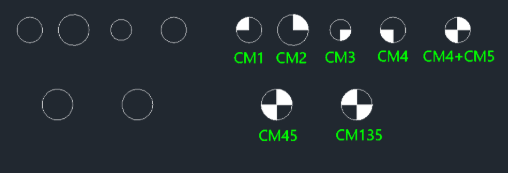
CM1CM2, CM3, CM4, CM45, CM135CM1.elfDraw Center Mark
Generates a Center of Gravity symbol.
Description
This tool automatically draws various types of center marks on selected circles.
- Variety
- Provides commands for different center mark styles (e.g., standard crosses, rotated crosses at 45 or 135 degrees).
- Combination
- You can apply multiple commands to the same circle to create complex center marks (e.g., applying CM1 and CM3 creates a CM135 style).
- Input
- Simply type the desired command (e.g., CM45) and click on an existing circle.
How to use
The specified center mark is drawn on the circle.
- 1.Type the desired command (e.g., cm45) in the command line and press Enter.
- 2.Select an existing Circle.
- Tip
- To create a combined mark like a starburst, use cm1 then cm3 (or cm2 then cm4) on the same circle.
Example
Included free
All 401 LISP utilities come free with every Cadopilar license.
Purchase any Cadopilar license and our team will install the complete suite for you. No additional charge, no setup headaches.
Contact us to get started →