LISP Utilities
DT2DT2.elfCreate Text (Ratio Spacing)
Creates text with spacing as a ratio of text height.
Description
This tool allows you to create multiple lines of text with specified, consistent spacing between them.
- Structured Text
- Instead of manual placement, you define the line spacing once and enter text line by line.
- Spacing Control
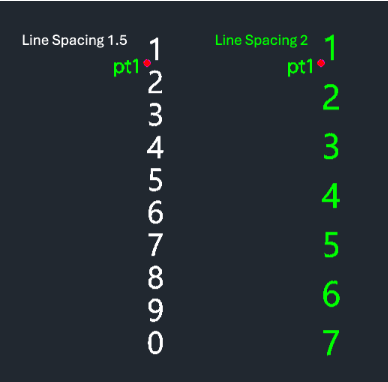
- You input a multiplier for line spacing. Entering 2 creates a gap equal to the text height.
- Input
- Requires a start point, a line spacing value, and then the text content for each line.
How to use
- 1.Type dt2 in the command line and press Enter.
- 2.Click the Start Point (PT1) for the first line of text.
- 3.Enter the Line Spacing Value (e.g., 2 for double spacing based on text height).
- 4.Type the Text Content and press Enter.
- 5.Repeat step 4 to add more lines.
- 6.Press Esc to finish and exit the command.
Example
Included free
All 401 LISP utilities come free with every Cadopilar license.
Purchase any Cadopilar license and our team will install the complete suite for you. No additional charge, no setup headaches.
Contact us to get started →