LISP Utilities
CLDCLD.ELFDraw Radial Line Series
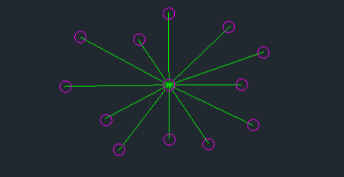
Generates multiple line segments radiating from a central shared origin.
Description
This tool allows you to continuously draw lines originating from a single central start point.
- Functionality
- Unlike the standard LINE command where the start point of the next segment is the end point of the previous one, this tool keeps the same start point (center) for every new line you draw.
- Compatibility
- This is a dedicated Cadopilar Lisp tool and works only within Cadopilar.
How to use
- 1.Type cld in the command line and press Enter.
- 2.Click the Center Point (Fixed Start Point).
- 3.Click Next Points sequentially. A line will be drawn from the fixed center point to each new point you click.
- 4.Press Esc to exit the command.
Example
Included free
All 401 LISP utilities come free with every Cadopilar license.
Purchase any Cadopilar license and our team will install the complete suite for you. No additional charge, no setup headaches.
Contact us to get started →