LISP Utilities
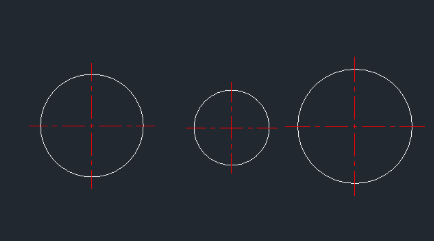
CL2cl2.elfSingle-Click Centerline Generator
Draw Centerline on a Single Circle, layer automatically generated.
Description
This tool is designed for one of the most frequent tasks in drafting : generating centerlines.
- Single-Click
- Instantly draws centerlines on Circles and Arcs with just one click.
- Auto-Layering
- Automatically creates the CENTER layer (if it doesn't exist) and places the lines on it.
- Smart Reset
- After drawing the centerline, it automatically resets the current layer back to 0 (Visible Line) so you don't accidentally keep drawing on the center layer.
How to use
The centerline is generated immediately.
- 1.Type CL2 in the command line and press Enter.
- 2.Select a Circle or an Arc.
Note
- This tool is significantly faster than standard commands because it removes the need to manually specify start and end points for the center cross.
Example
Included free
All 401 LISP utilities come free with every Cadopilar license.
Purchase any Cadopilar license and our team will install the complete suite for you. No additional charge, no setup headaches.
Contact us to get started →