LISP Utilities
ADIMadim.elfAuto Dimension
Enhanced QDIM command integrating horizontal, vertical, aligned, and diameter dimensions.
Description
This tool is an upgraded version of the standard QDIM command, designed to handle multiple dimension types intelligently.
- All-in-One Logic
- Unlike QDIM which focuses on horizontal/vertical/radius, ADIM automatically detects the object type and orientation to apply the correct dimension.
- Supported Types
- Supports Horizontal, Vertical, Aligned (sloped/inclined), and Diameter dimensions within a single command.
How to use
The appropriate dimension is created automatically.
- 1.Type ADIM in the command line and press Enter.
- 2.Select an object (Line or Circle).
- If Line
- It detects if it is horizontal, vertical, or inclined and applies the corresponding linear dimension.
- If Circle
- It applies a diameter dimension.
Example
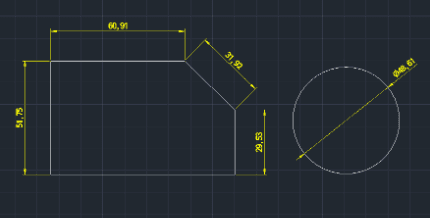
Included free
All 401 LISP utilities come free with every Cadopilar license.
Purchase any Cadopilar license and our team will install the complete suite for you. No additional charge, no setup headaches.
Contact us to get started →