Description
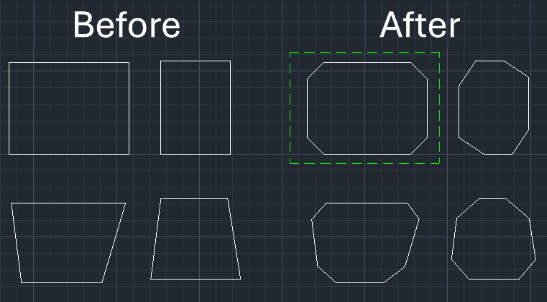
This tool automatically applies a Chamfer (Bevel) to all four corners of a rectangle (Polyline or Lines) simultaneously.
- Batch Processing
- Significantly faster than chamfering each corner individually.
- Versatility
- Supports both standard orthogonal rectangles and rotated (inclined) rectangles.
How to use
The tool automatically chamfers all four corners of the selected rectangle.
- 1.Type 4CH in the command line and press Enter.
- 2.Enter the First Chamfer Distance (Value 1).
- 3.Enter the Second Chamfer Distance (Value 2).
- 4.Select the rectangle using a Window Selection (click outside the object and drag to encompass it).
Example
Included free
All 401 LISP utilities come free with every Cadopilar license.
Purchase any Cadopilar license and our team will install the complete suite for you. No additional charge, no setup headaches.
Contact us to get started →