Description
This tool allows you to align text within a table cell to the left, center, or right.
- Flexibility
- It offers three alignment options: Left (1), Center (2), and Right (3).
- Selection Filter
- It automatically filters the selection to only affect text objects, so you don't need to worry if table lines are included in your selection window.
- Compatibility
- This is a dedicated Cadopilar Lisp tool and works only within Cadopilar.
How to use
1: Left Align
2: Center Align
3: Right Align.
The text within the selected area is automatically aligned based on your choice.
- 1.Type tta in the command line and press Enter.
- 2.Enter an Alignment Option number:
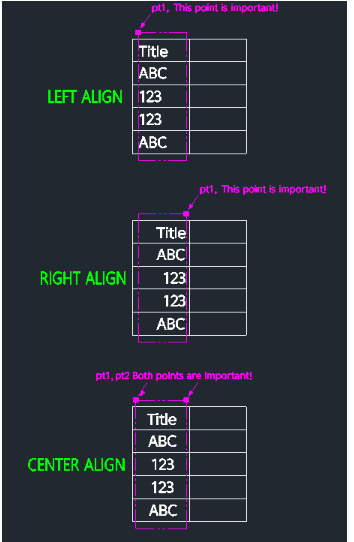
- 3.Select the area (draw a rectangle) encompassing the text and the table cell boundaries:
- For Left Align (1)
- Ensure the left edge of your selection rectangle aligns with where you want the text to start.
- For Center Align (2)
- define the rectangle carefully to cover the full width of the cell (left and right boundaries) so the text centers correctly between them.
- For Right Align (3)
- Ensure the right edge of your selection rectangle aligns with the desired right boundary.
Example
Included free
All 401 LISP utilities come free with every Cadopilar license.
Purchase any Cadopilar license and our team will install the complete suite for you. No additional charge, no setup headaches.
Contact us to get started →