LISP Utilities
CTRIMCTRIM.elfTrim Wall Corner (L-Joint)
Trims intersecting double lines to form a clean L-corner.
Description
This tool is the final installment in the double-wall trimming series, designed to automatically trim the corner intersections of double walls.
- Precision
- It requires clicking two specific points to identify the inner corner and the outer extensions.
- Compatibility
- This is a dedicated Cadopilar Lisp tool and works only within Cadopilar.
How to use
- 1.Type CTRIM in the command line and press Enter.
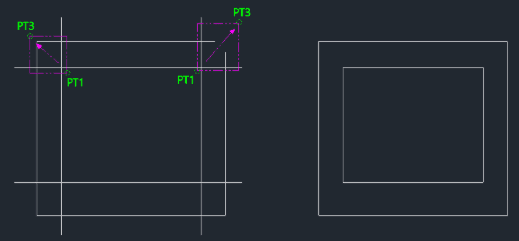
- 2.Click the First Point (PT1) inside the corner intersection.
Note
- You must click as close as possible to the intersection point for the tool to work correctly.
- This point can be slightly further away, but it must cross the extending lines you want to trim.
Example
Included free
All 401 LISP utilities come free with every Cadopilar license.
Purchase any Cadopilar license and our team will install the complete suite for you. No additional charge, no setup headaches.
Contact us to get started →