Description
This tool allows you to quickly change the size of text objects using either a specific height value or a scale factor.
- Flexibility
- It offers two modes: setting an exact text height or applying a multiplier (scale) to the existing size.
- Compatibility
- This is a dedicated Cadopilar Lisp tool and works only within Cadopilar.
How to use
The text size is immediately updated.
- 1.Type tsz in the command line and press Enter.
- 2.Select the Text Object(s) you want to resize.
- 3.Choose an option:
- 4.Enter the desired value (Height or Scale) and press Enter.
- Option 1 (Default)
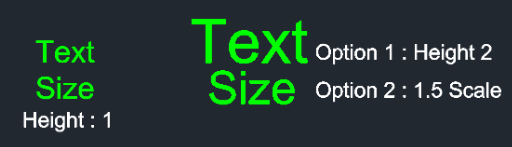
- Press Enter (or type 1) to input a specific Text Height value.
- Option 2
- Type 2 and press Enter to input a Scale Factor (multiplier) to increase or decrease the size relative to its current height.
Example
Included free
All 401 LISP utilities come free with every Cadopilar license.
Purchase any Cadopilar license and our team will install the complete suite for you. No additional charge, no setup headaches.
Contact us to get started →