Description
This tool allows for immediate trimming without the initial step of selecting cutting edges.
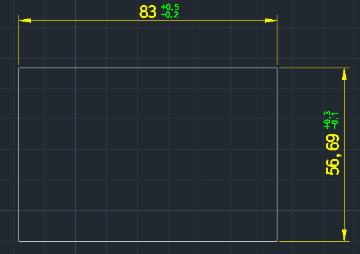
This tool allows you to easily insert Deviation Tolerances (upper and lower limits) next to existing dimension text without modifying dimension styles.
- Streamlined Workflow
- Standard TRIM commands often require you to "Select Cutting Edges" > "Enter" > "Select Object to Trim". With TR2, you simply run the command and start trimming immediately.
- Auto-Boundary
- It treats all visible objects on the screen as potential cutting edges automatically (similar to the "Quick Trim" or "Trim > Enter" workflow in other CAD software).
- No Styles Needed
- Bypasses the complex DIMSTYLE setup for tolerances.
- Auto-Formatting
- Automatically adds the + and - signs to your numeric inputs.
- Layer Aware
- The tolerance text is created on your Current Layer.
- Limitation
- Supports Horizontal and Vertical dimensions only (Aligned/Rotated dimensions are not supported).
How to use
Immediately click on the objects (or segments) you want to trim.
The segments are trimmed instantly based on the nearest visible boundaries.
The deviation tolerance is generated immediately at the selected location.
- 1.Type TR2 in the command line and press Enter.
- 2.Press ESC to finish.
- 3.Type TOL2 in the command line and press Enter.
- 4.Select a Dimension Object (Horizontal or Vertical).
- 5.Specify the Insertion Point for the tolerance text (typically the bottom-right corner of the dimension measurement).
- 6.Enter the Plus (+) value (number only).
- 7.Enter the Minus (-) value (number only).
Note
- This command only calculates trimming boundaries based on objects currently visible on the screen.
Example
Included free
All 401 LISP utilities come free with every Cadopilar license.
Purchase any Cadopilar license and our team will install the complete suite for you. No additional charge, no setup headaches.
Contact us to get started →