LISP Utilities
TOL2tol2.elfAdd Deviation Tol.
Adds deviation tolerances to selected dimension objects using input values, without requiring a separate dimension style. (Supports horizontal and vertical dimensions only).
Description
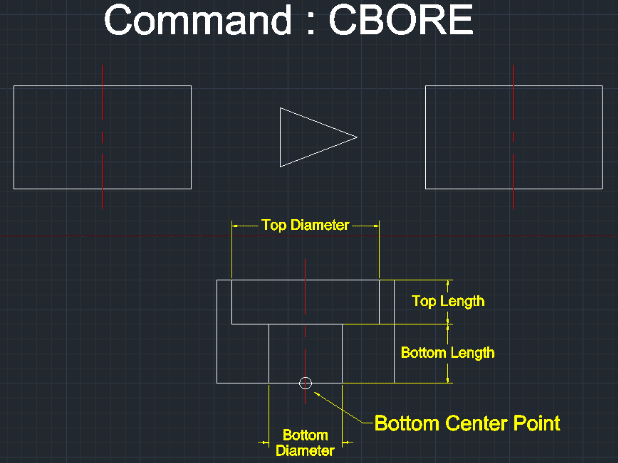
This tool automates the creation of Counterbore holes, a frequent task in mechanical drafting.
- Dual View Generation
- Automatically draws both the Side View (Cross-section) and the Top View (Plan view) simultaneously.
- Full Angle Support
- Capable of generating counterbores at any angle, not just vertically.
How to use
The tool instantly generates the complete counterbore geometry (Side + Top views).
- 1.Type CBORE in the command line and press Enter.
- 2.Specify the Bottom Center Point (The starting point of the hole).
- 3.Specify the Direction of Counterbore
- 4.Enter the Bottom Diameter (Drill diameter).
- 5.Enter the Bottom Length (Drill depth).
- 6.Enter the Top Diameter (Counterbore diameter).
- 7.Enter the Top Length (Counterbore depth).
Example
Included free
All 401 LISP utilities come free with every Cadopilar license.
Purchase any Cadopilar license and our team will install the complete suite for you. No additional charge, no setup headaches.
Contact us to get started →