LISP Utilities
SSANGSSANG.ELFAutomated Horizontal and Vertical Dimensioning for Pairs
Generates symmetric dimension sets.
Description
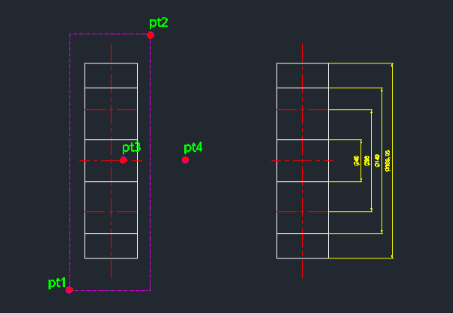
This tool automatically creates paired horizontal and vertical dimensions for a feature relative to a center line.
- Dual Dimensioning
- Simultaneously creates dimensions for width and diameter/height using a centerline reference.
- Optional Diameter Symbol
- Allows for the automatic addition of a diameter symbol (Ø) to the dimension text upon completion.
How to use
- 1.Type ssang in the command line and press Enter.
- 2.Click the First Feature Point (PT1).
- 3.Click the Second Feature Point (PT2).
- 4.Click a point on the Centerline (PT3).
- 5.Click a point to define the Dimension Position/Direction (PT4).
- 6.Press Enter to add the Ø symbol, or Esc to finish without it.
Example
Included free
All 401 LISP utilities come free with every Cadopilar license.
Purchase any Cadopilar license and our team will install the complete suite for you. No additional charge, no setup headaches.
Contact us to get started →