LISP Utilities
INSULINSUL.ELFAutomated Insulation Drawing
Generates insulation batting by specified thickness.
Description
This tool automates the drawing of insulation batting (zig-zag lines) in architectural drawings.
- Simple Creation
- Draws standard insulation patterns by picking points.
- Customizable
- The pattern is generated based on the width and length defined by the selected points.
- Input
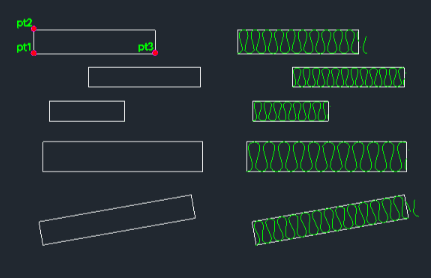
- Requires picking three points: start point, width/thickness point, and end/length point.
How to use
The insulation pattern is drawn.
- 1.Type insul in the command line and press Enter.
- 2.Click the Start Point (PT1).
- 3.Click the Width Point (PT2) to define the insulation thickness.
- 4.Click the End Point (PT3) to define the length and direction.
Note
- You may need to trim any excess lines manually if the pattern extends slightly beyond the desired boundary.
Example
Included free
All 401 LISP utilities come free with every Cadopilar license.
Purchase any Cadopilar license and our team will install the complete suite for you. No additional charge, no setup headaches.
Contact us to get started →