Description
This tool creates a semicircular groove (round cut) on a shaft or cylindrical object.
- Usage Context
- It is designed to work well with the SHAFT command, allowing you to easily add groove details to an existing shaft drawing.
How to use
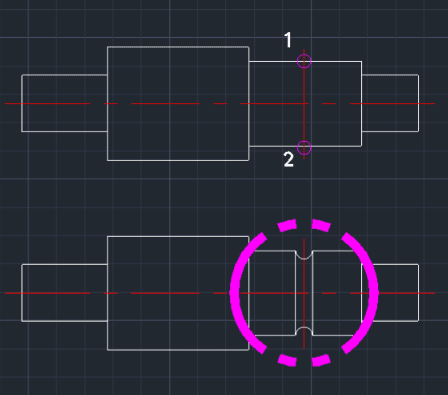
A semicircular groove is automatically cut into the shaft at the specified location.
- 1.Type SR in the command line and press Enter.
- 2.Click the First Intersection Point (start of the groove location).
- 3.Click the Second Intersection Point (end of the groove location).
- 4.Enter the Radius of the groove (e.g., 3) and press Enter.
Example
Included free
All 401 LISP utilities come free with every Cadopilar license.
Purchase any Cadopilar license and our team will install the complete suite for you. No additional charge, no setup headaches.
Contact us to get started →