LISP Utilities
RCBRCB.elfDraw Corner C-Bore in Rectangle
Generates counterbore holes at the inner corners of a rectangle.
Description
This tool automatically draws counterbore holes (top view) inside the corners of a selected rectangle.
- Automation
- Places counterbore circles at defined offsets from the rectangle's corners.
- Inputs
- Requires a reference point on the rectangle, hole offsets, and hole diameters.
How to use
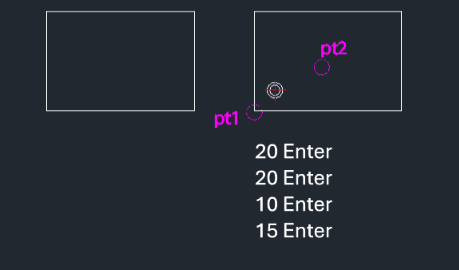
- 1.Type rcb in the command line and press Enter.
- 2.Click the Bottom-Left Corner of the rectangle.
- 3.Click any point inside the rectangle to confirm selection/direction.
- 4.Enter the Horizontal Offset (distance from corner to hole center).
- 5.Enter the Vertical Offset (distance from corner to hole center).
- 6.Enter the Small Diameter (Thru hole).
- 7.Enter the Large Diameter (Counterbore).
Example
Included free
All 401 LISP utilities come free with every Cadopilar license.
Purchase any Cadopilar license and our team will install the complete suite for you. No additional charge, no setup headaches.
Contact us to get started →