LISP Utilities
PWOPWO.elfPolyline With Outline
Generates a polyline with a solid hatch and visible line.
Description
This tool draws a wide polyline filled with a solid hatch and bordered by an outline.
- Visual Effect
- It creates a filled strip (like a thick trace) with a distinct border color.
- Color Setting
- The outline (border) color is preset to Color 1 (Red).
- Compatibility
- This is a dedicated Cadopilar Lisp tool and works only within Cadopilar.
How to use
Define the Thickness (Width):
You can either pick two points on the screen to define the width visually.
Or type a numeric value for the width and press Enter.
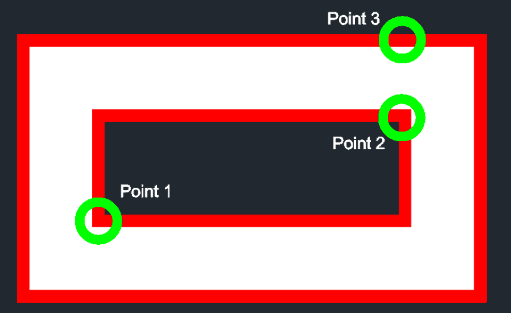
The polyline is drawn with a solid fill and a red outline.
- 1.Type pwo in the command line and press Enter.
- 2.Click the First Point of the polyline.
- 3.Click the Second Point to define the segment.
Example
Included free
All 401 LISP utilities come free with every Cadopilar license.
Purchase any Cadopilar license and our team will install the complete suite for you. No additional charge, no setup headaches.
Contact us to get started →