LISP Utilities
AR20DAR20UAR20D.elfDraw Array Arrows (Down) / (Up)
Generates an array of 20 arrows pointing Upward / Downward
Description
This tool automatically draws a grid of 20 arrows within a specified rectangular area.
- Direction Control
- You can choose between upward-pointing arrows (AR20U) or downward-pointing arrows (AR20D).
- Selection Order Importance
- The order in which you define the rectangular area determines the correct orientation and placement.
- Compatibility
- This is a dedicated Cadopilar Lisp tool and works only within Cadopilar.
How to use
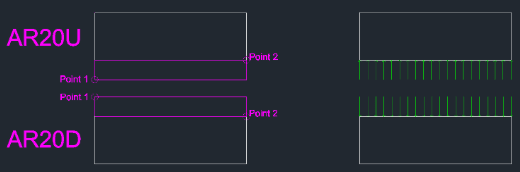
Define the Rectangular Area by clicking two diagonal points:
A set of 20 arrows (arranged in a grid) is drawn within the defined boundary, pointing in the selected direction.
- 1.Type ar20u (for Up) or ar20d (for Down) in the command line and press Enter.
- For AR20U (Up)
- Click the Bottom-Left corner first, then the Top-Right corner.
- For AR20D (Down)
- Click the Top-Left corner first, then the Bottom-Right corner.
Example
Included free
All 401 LISP utilities come free with every Cadopilar license.
Purchase any Cadopilar license and our team will install the complete suite for you. No additional charge, no setup headaches.
Contact us to get started →