Description
This tool automatically draws a flange at the end of a pipe.
- Component Generation
- Streamlines the creation of flange details on piping drawings.
- Input
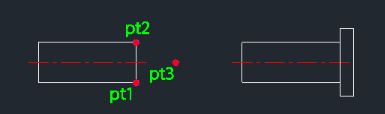
- Requires selecting two points to define the pipe's end/diameter, a direction point for the flange orientation, the flange outer diameter, and the flange width/thickness.
- Centerline
- Automatically generates a center line on a dedicated layer if one doesn't exist.
How to use
- 1.Type pflg in the command line and press Enter.
- 2.Click PT1 (one side of the pipe end).
- 3.Click PT2 (the other side of the pipe end).
Note
- The order of PT1 and PT2 doesn't matter.
Example
Included free
All 401 LISP utilities come free with every Cadopilar license.
Purchase any Cadopilar license and our team will install the complete suite for you. No additional charge, no setup headaches.
Contact us to get started →