Description
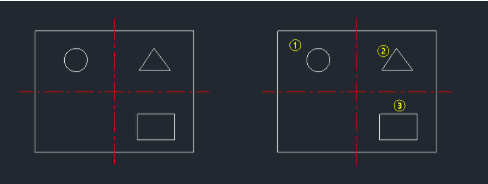
This tool automates the creation of numbered circles (balloons).
- Sequential Numbering
- Automatically increments the number for each new circle created.
- Customizable
- Allows you to define the circle diameter and the starting number.
- Point-and-Click
- Simply click locations to place numbered circles in sequence.
How to use
- 1.Type num in the command line and press Enter.
- 2.Enter the Diameter for the circles and press Enter.
- 3.Enter the Start Number and press Enter.
- 4.Click the desired points in the drawing to place the numbered circles (1, 2, 3, etc.).
- 5.Press Esc to finish.
Example
Included free
All 401 LISP utilities come free with every Cadopilar license.
Purchase any Cadopilar license and our team will install the complete suite for you. No additional charge, no setup headaches.
Contact us to get started →