Description
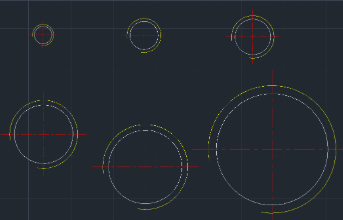
This tool draws the plan view of a Metric Screw (Female Thread) commonly used in mechanical design.
- Supported Sizes
- Supports a wide range of metric sizes from M1 to M30 (e.g., M1, M2, M3, M4, M5, M6, M8, M10, M12, M16, M20, M24, M30, etc.).
- Layer Automation
- Automatically creates Center and Thin layers if they do not exist.
- Visibility Control
- Automatically adjusts the Linetype Scale (celtscale) to ensure centerlines are clearly visible.
How to use
The tool draws the centerlines and the thread representation automatically.
- 1.Type nasa in the command line and press Enter.
- 2.Enter the Screw Size (only the number, e.g., type 8 for M8).
- 3.Click the Insertion Point where you want to place the screw hole.
Example
Included free
All 401 LISP utilities come free with every Cadopilar license.
Purchase any Cadopilar license and our team will install the complete suite for you. No additional charge, no setup headaches.
Contact us to get started →