LISP Utilities
MZMZ.elfMatch Elevation (Z-Axis)
Matches object Z-elevation to reference line Z-elevation.
Description
This tool allows you to match the Z-value (elevation) of an object to that of a reference line.
- Problem Solved
- It is designed for 3D drafting scenarios where objects may have slightly mismatched Z-values, preventing commands like TRIM, FILLET, or CHAMFER from working correctly.
- Function
- You select a reference object with the correct Z-value, and the tool applies that elevation to other selected objects (Lines, Circles, Arcs, etc.).
- Compatibility
- This is a dedicated Cadopilar Lisp tool and works only within Cadopilar.
How to use
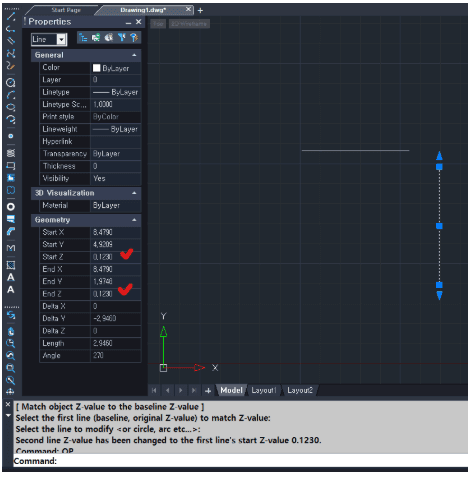
(Optional) Verify the change by selecting the modified object and pressing Ctrl+1 to check its Z-value in the Properties window.
- 1.Type MZ in the command line and press Enter.
- 2.Select the Reference Line (the object with the desired Z-value).
- 3.Select the Target Object(s) (Lines, Circles, Arcs, etc.) that you want to move to the reference Z-elevation.
Example
Included free
All 401 LISP utilities come free with every Cadopilar license.
Purchase any Cadopilar license and our team will install the complete suite for you. No additional charge, no setup headaches.
Contact us to get started →