Description
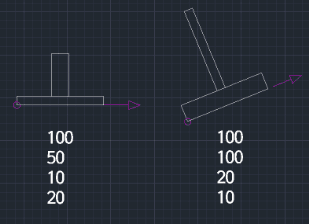
This tool draws a "Double T-Line" (a T-shaped object with defined thickness/width for both the horizontal and vertical segments).
- Function
- Unlike the single T-line tool (which draws simple lines), this tool creates a T-shape with "double lines" or thickness, making it suitable for representing structural beams, shafts, or connected components.
- Flexibility
- It works in any direction and allows you to specify separate dimensions for the lengths and thicknesses of the horizontal and vertical parts.
- Application
- It can be applied to tasks like drawing shafts connected horizontally.
- Compatibility
- This is a dedicated Cadopilar Lisp tool and works only within Cadopilar.
How to use
The double T-line shape is automatically drawn based on these inputs.
- 1.Type DTL in the command line and press Enter.
- 2.Click the Bottom-Left Start Point.
- 3.Click a point to define the Direction for the bottom (horizontal) segment.
- 4.Enter the Horizontal Length.
- 5.Enter the Vertical Length.
- 6.Enter the Horizontal Thickness.
- 7.Enter the Vertical Thickness.
Example
Included free
All 401 LISP utilities come free with every Cadopilar license.
Purchase any Cadopilar license and our team will install the complete suite for you. No additional charge, no setup headaches.
Contact us to get started →