LISP Utilities
MTOMMTOM.ELFDraw Connecting Lines Between Boxes
Generates connector lines between boxes.
Description
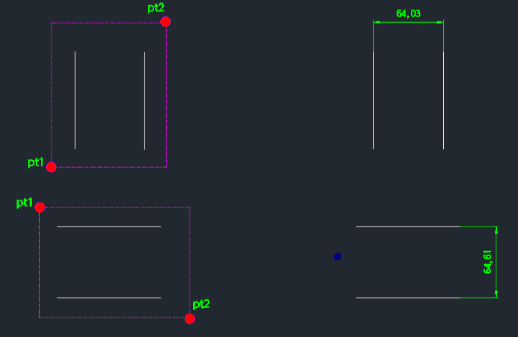
This tool creates vertical or horizontal linear dimensions (DLI) instantly by selecting two lines with a window.
- Smart Positioning
- The dimension line is automatically placed at the location of the second point (PT2) used for the selection window.
- Selection Constraint
- The selection window must enclose exactly two lines for the command to function correctly.
How to use
- 1.Type w2 in the command line and press Enter.
- 2.Click the First Point (PT1) to start the selection window.
- 3.Click the Second Point (PT2) to finish the selection.
Note
- Ensure only two lines are inside the window. The dimension line will appear at the location of this second click.
Example
Included free
All 401 LISP utilities come free with every Cadopilar license.
Purchase any Cadopilar license and our team will install the complete suite for you. No additional charge, no setup headaches.
Contact us to get started →