LISP Utilities
DWGMGDWGMGInsert Multiple Drawings into Current Drawing
Merges external drawings from the local folder.
Description
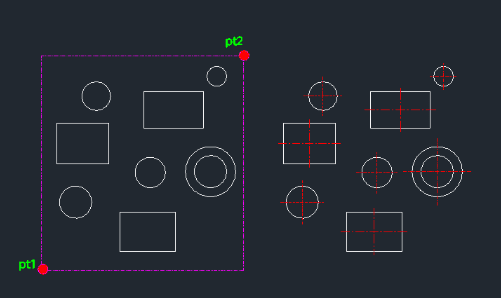
This tool automatically draws centerlines for multiple rectangles and circles at once.
- Batch Processing
- Select a group of objects (rectangles and circles) using a window, and the tool will generate centerlines for all valid shapes found within.
- Smart Detection
- It identifies circles and rectangular shapes within the selection area to apply centerlines.
How to use
Centerlines are automatically drawn for all detected circles and rectangles inside the selection.
- 1.Type allc in the command line and press Enter.
- 2.Click the First Point (PT1) to start the selection window.
- 3.Click the Second Point (PT2) to finish the selection window, enclosing the objects you want to process.
Example
Included free
All 401 LISP utilities come free with every Cadopilar license.
Purchase any Cadopilar license and our team will install the complete suite for you. No additional charge, no setup headaches.
Contact us to get started →