LISP Utilities
MARCMARC.elfContinuous Tangent Arcs
Sequentially generates tangent arcs between pairs of selected lines.
Description
This tool allows you to continuously draw arcs between pairs of selected lines without restarting the command.
- Action
- Creates an arc (fillet) connecting two selected lines.
- Continuous
- Designed for repetitive use; you can keep selecting pairs of lines to draw arcs until you manually exit.
How to use
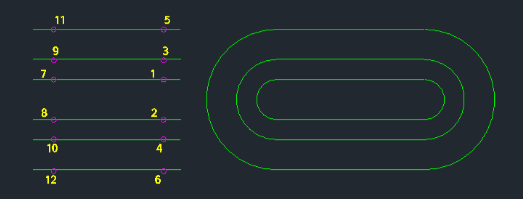
Continuously click the next First Line and Second Line to draw more arcs.
- 1.Type marc in the command line and press Enter.
- 2.Click the First Line.
- 3.Click the Second Line (an arc is drawn between them).
- 4.Press Esc to finish.
Example
Included free
All 401 LISP utilities come free with every Cadopilar license.
Purchase any Cadopilar license and our team will install the complete suite for you. No additional charge, no setup headaches.
Contact us to get started →