Description
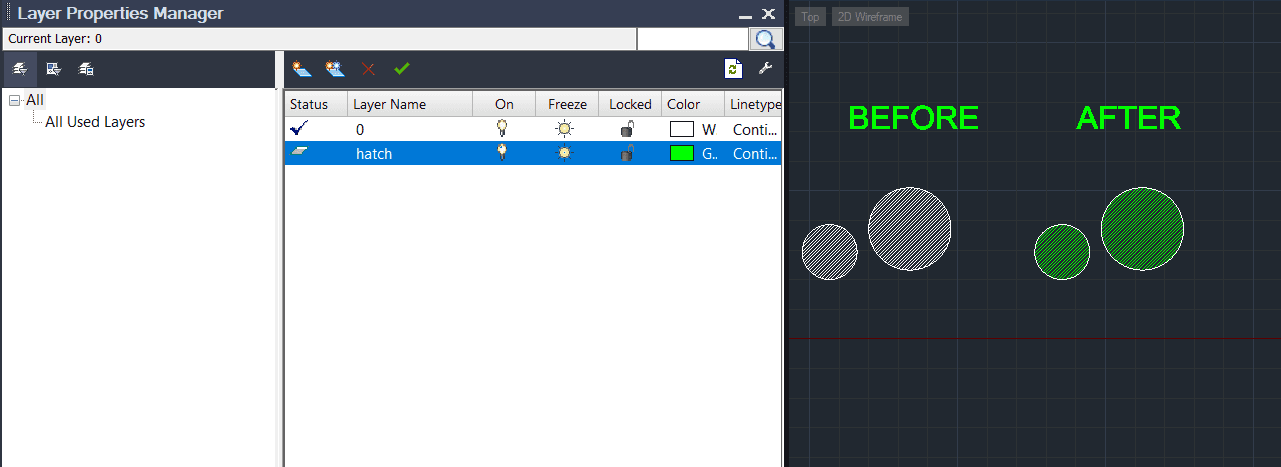
This tool automatically finds all hatch objects in the drawing and moves them to a specific layer named "HATCH".
- Function
- It is particularly useful for printing/plotting when you want to exclude hatch patterns.
- Auto-Creation
- If the "HATCH" layer does not exist, the tool automatically creates it (defaulting to green color).
- Usage Scenario
- After moving hatches to this layer, you can easily turn off the "HATCH" layer or set it to "No Plot" in the Layer Manager to print the drawing without hatches.
How to use
The tool automatically processes the entire drawing, moving all hatch objects to the HATCH layer.
(Optional) You can change the color or properties of the "HATCH" layer in the Layer Manager after the command finishes.
- 1.Type HTOL in the command line and press Enter.
Example
Included free
All 401 LISP utilities come free with every Cadopilar license.
Purchase any Cadopilar license and our team will install the complete suite for you. No additional charge, no setup headaches.
Contact us to get started →