LISP Utilities
LATLAT.elfDraw Aligned Arrowheads
Places arrowheads at both ends of a line with aligned text
Description
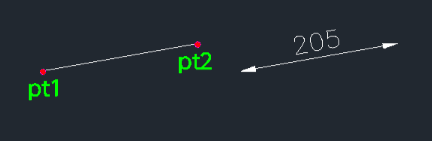
This tool draws a leader-style arrow between two points and places a text label next to it (specifically designed to place text under the arrow line).
- Orientation
- The placement of the text (e.g., below the line) depends on the direction you draw; clicking the top point first positions the text downwards.
- Customization
- You can define the specific length of the arrowhead or use the default dimension settings.
How to use
- 1.Type lat in the command line and press Enter.
- 2.Click the Start Point (PT1).
- 3.Click the End Point (PT2).
- 4.Enter the Arrow Length (Press Enter to use the default size).
- 5.Type the desired Text.
- 6.Press Enter twice to finish.
Example
Included free
All 401 LISP utilities come free with every Cadopilar license.
Purchase any Cadopilar license and our team will install the complete suite for you. No additional charge, no setup headaches.
Contact us to get started →