Description
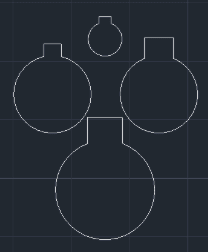
This tool automates the process of adding a Keyway (Key slot) to an existing circular hole.
- Smart Logic
- (Updated v1.2) The logic has been improved to handle existing centerlines correctly without cutting errors.
- Simple Input
- Generates the keyway geometry simply by selecting the circle and inputting the width and height.
How to use
The keyway is automatically drawn and trimmed into the circle.
- 1.Type KEYH in the command line and press Enter.
- 2.Select the Circle (The hole where the keyway will be added).
- 3.Enter the Width of the keyway.
- 4.Enter the Height of the keyway.
Example
Included free
All 401 LISP utilities come free with every Cadopilar license.
Purchase any Cadopilar license and our team will install the complete suite for you. No additional charge, no setup headaches.
Contact us to get started →