Description
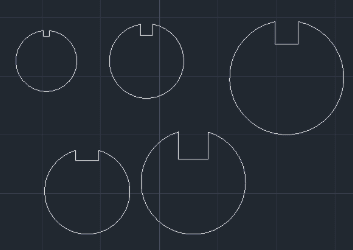
This tool automatically cuts a Keyseat (Keyway groove) into a shaft cross-section (Circle).
- Multi-Directional
- You can generate the keyseat in any direction (Top, Bottom, Left, Right, etc.) by simply clicking the desired side.
- Interactive
- Quickly applies standard keyway dimensions (Width and Depth) to an existing circle.
How to use
The keyseat geometry is automatically trimmed and generated.
- 1.Type HOM in the command line and press Enter.
- 2.Select the Circle (Shaft cross-section).
- 3.Click a point to define the Direction of the keyseat.
- 4.Enter the Width of the keyseat.
- 5.Enter the Depth of the keyseat.
Note
- Note : For best results, ensure the circle is zoomed in sufficiently on the screen before running the command. If the view is too far out, the object selection might not register correctly.
Example
Included free
All 401 LISP utilities come free with every Cadopilar license.
Purchase any Cadopilar license and our team will install the complete suite for you. No additional charge, no setup headaches.
Contact us to get started →