LISP Utilities
HORHOR.ELFHorizontal/Vertical Continuous Dimensioning
Generates linear baseline and continuous dimensions.
Description
This tool creates continuous horizontal (or vertical) dimensions based on a baseline and adds an overall total dimension.
- Continuous Chain
- Automatically creates a chain of dimensions between successive points picked by the user.
- Total Dimension
- Generates an overall dimension spanning the entire range of the selected points.
- Input
- Requires picking a starting base point and then sequential points for dimensioning.
How to use
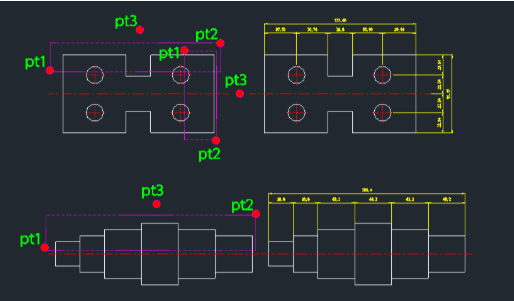
Continue clicking subsequent points (PT4, PT5, etc.) to create the chain of dimensions.
The tool automatically places continuous dimensions for each segment and a total dimension for the entire length.
- 1.Type hor in the command line and press Enter.
- 2.Click the Start Point (PT1) for the dimension line.
- 3.Click the End Point of the first segment (PT2).
- 4.Click a point to define the Dimension Position/Direction (PT3).
Example
Included free
All 401 LISP utilities come free with every Cadopilar license.
Purchase any Cadopilar license and our team will install the complete suite for you. No additional charge, no setup headaches.
Contact us to get started →