LISP Utilities
ADACADAC.ELFAutomatic Dimensioning for Arcs and Circles
Generates dimensions for all selected circles and arcs.
Description
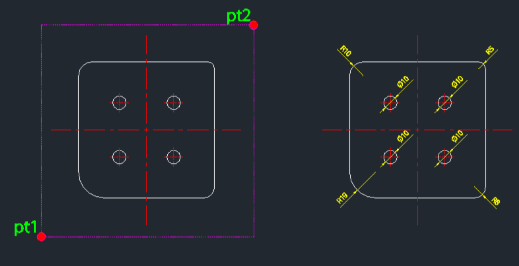
This tool automatically detects and dimensions all arcs and circles within a user-selected area.
- Smart Detection
- Identifies circular geometry (arcs and circles) inside the selection window and applies the correct dimension type (Radius for Arcs, Diameter for Circles).
- Batch Processing
- Handles multiple arcs and circles in a single operation, significantly speeding up annotation.
How to use
- 1.Type adac in the command line and press Enter.
- 2.Click the First Corner (PT1) of the selection area.
- 3.Click the Diagonal Corner (PT2) to complete the selection.
- 4.Press Enter to automatically dimension all selected arcs and circles.
Example
Included free
All 401 LISP utilities come free with every Cadopilar license.
Purchase any Cadopilar license and our team will install the complete suite for you. No additional charge, no setup headaches.
Contact us to get started →