LISP Utilities
EX2ex2.elfQuick Extend
Executes an immediate extend command. (Note: Applies only to objects currently on the screen.)
Description
This tool allows for immediate extension of lines without the initial step of selecting boundary edges.
- Streamlined Workflow
- Standard EXTEND commands often require you to "Select Boundary Edges" > "Enter" > "Select Object to Extend". With EX2, you simply run the command and start extending immediately.
- Auto-Boundary
- It treats all visible objects on the screen as potential boundary edges automatically (similar to the "Quick Extend" or "Extend > Enter" workflow in other CAD software).
How to use
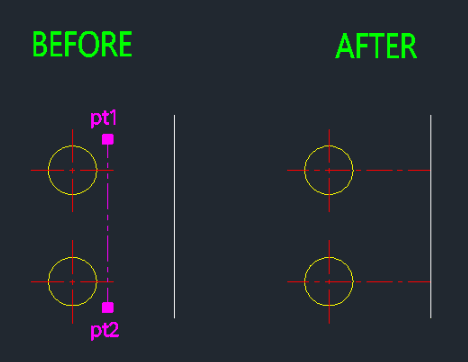
Immediately click on the objects you want to extend.
The lines are extended instantly to the nearest visible boundary.
- 1.Type EX2 in the command line and press Enter.
- 2.Press ESC to finish.
Note
- This command only calculates extension boundaries based on objects currently visible on the screen.
Example
Included free
All 401 LISP utilities come free with every Cadopilar license.
Purchase any Cadopilar license and our team will install the complete suite for you. No additional charge, no setup headaches.
Contact us to get started →