LISP Utilities
ECAeca.elfDraw Circle Array in Rectangle
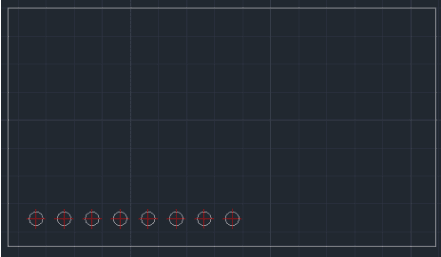
Generates linear circle array inside a rectangle at a specified offset
Description
This tool draws a Circle inside a rectangle at a precise location and immediately creates a linear Array of that circle.
- Combine & Conquer
- Combines positioning a hole (like the EC command) and arraying it (like the ARRAY command) into a single workflow.
- Corner Reference
- Starts the pattern based on a specific offset from any corner of the rectangle.
How to use
The tool automatically draws the first circle and arrays the rest in a single line.
- 1.Type ECA in the command line and press Enter.
- 2.Select the Corner Point of the existing rectangle (reference).
- 3.Click roughly towards the Inside (center) of the rectangle to define the direction.
- 4.Enter the X Distance (Offset) from the corner to the first circle's center.
- 5.Enter the Y Distance (Offset) from the corner to the first circle's center.
- 6.Enter the Diameter of the circle.
- 7.Enter the Total Number of circles (Count).
- 8.Enter the Distance between circles (Pitch).
Example
Included free
All 401 LISP utilities come free with every Cadopilar license.
Purchase any Cadopilar license and our team will install the complete suite for you. No additional charge, no setup headaches.
Contact us to get started →