LISP Utilities
EC4ec4.elfDraw 4 Corner Circles in Rectangle
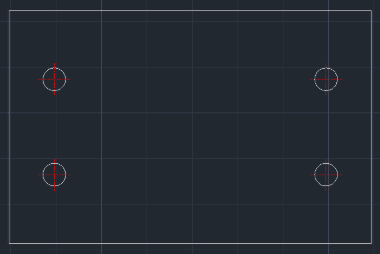
Generates 4 circles and centerlines at equal offsets from each rectangle corner.
Description
This tool automatically draws 4 circles (holes) inside a rectangle, one near each corner, with precise offsets.
- Symmetrical Pattern
- Places four holes symmetrically, all equidistant from their respective corners.
- Auto-Scaling Centerlines
- Automatically creates the CENTER layer (if missing) and adjusts the linetype scale (CELTSCALE) based on the circle's diameter to ensure visibility.
How to use
The tool instantly draws the 4 circles and their centerlines.
- 1.Type EC4 in the command line and press Enter.
- 2.Specify the Bottom-Left corner of the rectangle.
- 3.Specify the Top-Right corner of the rectangle.
- 4.Enter the X Distance (Offset) from the corner to the circle's center.
- 5.Enter the Y Distance (Offset) from the corner to the circle's center.
- 6.Enter the Diameter of the circles.
Example
Included free
All 401 LISP utilities come free with every Cadopilar license.
Purchase any Cadopilar license and our team will install the complete suite for you. No additional charge, no setup headaches.
Contact us to get started →