LISP Utilities
CMCCMC.elfCircle Multi Copy
Generates a series of circles and centerlines at specified intervals.
Description
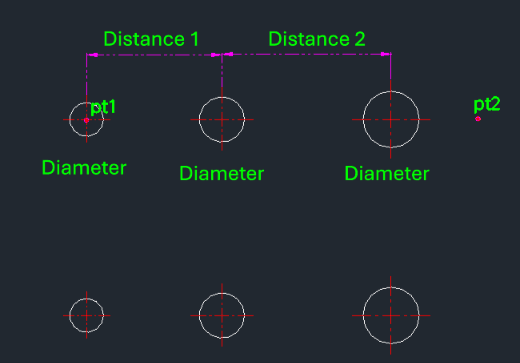
This tool creates a sequence of circles and centerlines along a path with varying diameters and spacing intervals.
- Automation
- Automatically generates centerlines if they don't exist and adjusts the LTSCALE based on the circle's radius.
- Workflow
- Allows for continuous input of different diameters and distances in a single command session.
How to use
- 1.Type cmc in the command line and press Enter.
- 2.Click the Start Point (PT1).
- 3.Click the Direction Point (PT2).
- 4.Enter the Diameter of the first circle.
- 5.Enter the Distance to the next circle.
- 6.Enter the Diameter of the next circle.
- 7.Repeat steps 5 and 6 as needed.
- 8.Press Esc to exit.
Example
Included free
All 401 LISP utilities come free with every Cadopilar license.
Purchase any Cadopilar license and our team will install the complete suite for you. No additional charge, no setup headaches.
Contact us to get started →