LISP Utilities
CINRcinr.elfDraw Circle at Rect Center
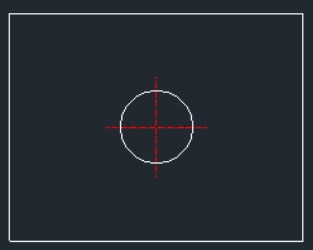
Generates a circle and centerlines at the center of a rectangle.
Description
This tool creates a single Circle and its centerlines exactly at the geometric Center of a rectangle.
- Instant Centering
- Eliminates the need to draw diagonal lines or use "Midpoint between two points" to find the center.
- Simple Workflow
- Just define the rectangular area, and the tool places the hole right in the middle.
How to use
The circle and centerlines are drawn immediately at the exact center of the rectangle.
- 1.Type CINR in the command line and press Enter.
- 2.Specify the Bottom-Left corner of the rectangle.
- 3.Specify the Top-Right corner of the rectangle.
- 4.Enter the Radius of the circle.
Example
Included free
All 401 LISP utilities come free with every Cadopilar license.
Purchase any Cadopilar license and our team will install the complete suite for you. No additional charge, no setup headaches.
Contact us to get started →