LISP Utilities
2CRI2cri.elfDraw 2 Side Circles Inside Rect (Int)
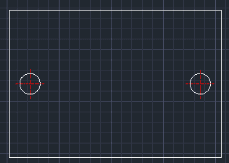
Generates two circles and centerlines inside both sides of a rectangle
Description
This tool automatically draws 2 circles (holes) inside the left and right sides of a rectangle.
- Inner Alignment
- Places the holes inside the rectangular boundary, aligned to the vertical center.
- Precision Positioning
- You specify exactly how far inward from the edge the holes should be placed.
- Complete Geometry
- Generates both the holes and their centerlines instantly.
How to use
The tool draws the two holes and centerlines inside the rectangle.
- 1.Type 2CRI in the command line and press Enter.
- 2.Specify the Bottom-Left corner of the rectangle.
- 3.Specify the Top-Right corner of the rectangle.
- 4.Enter the Distance from the side edge to the center of the hole (inward).
- 5.Enter the Radius of the circles.
Example
Included free
All 401 LISP utilities come free with every Cadopilar license.
Purchase any Cadopilar license and our team will install the complete suite for you. No additional charge, no setup headaches.
Contact us to get started →